Ultimate PES File Converter for Beginners & Embroidery Experts
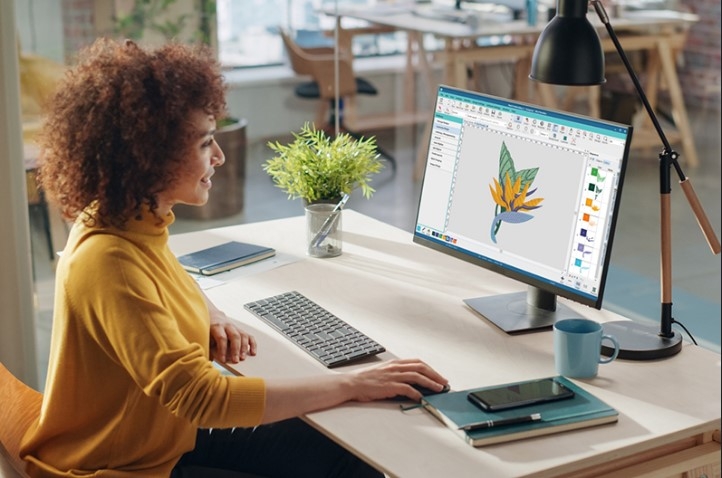
If you own a Brother or Babylock embroidery machine, you already know how important a PES File Converter is for turning regular images into stitch-ready designs. Without proper conversion, even the most beautiful logo or artwork simply won’t stitch correctly. Whether you’re brand new to machine embroidery or an experienced professional handling bulk orders, understanding how PES conversion works can make your embroidery cleaner, faster, and far more profitable.
In this ultimate guide, we’ll break down exactly what a PES file is, how conversion works, why quality matters, and how beginners and experts can both benefit from using the right tools and services.
What Is a PES File and Why Does It Matter?
A PES file is a specialized embroidery file format created specifically for Brother and Babylock machines. Unlike a simple image file, a PES file contains detailed stitch instructions that tell the machine:
- Where to place each stitch
- What stitch type to use
- When to change colors
- How dense the stitches should be
- The exact embroidery sequence
Your embroidery machine doesn’t “see” pictures, it reads stitching commands. A PES file essentially acts as a digital road map that guides every movement of the needle. Without it, your machine simply can’t embroider your design.
What Does a PES File Converter Do?
A PES File Converter transforms standard image or vector files into machine-readable PES embroidery files. It converts popular formats such as:
- JPG
- PNG
- SVG
- AI
- DST
- EXP
- JEF
into a PES file your embroidery machine understands. The converter translates shapes, colors, and outlines into precise stitch commands, ensuring your design sews properly onto fabric.
Who Needs a PES File Converter?
PES conversion is essential for a wide range of users, including:
- Home embroidery hobbyists
- Custom apparel businesses
- Uniform suppliers
- Promotional product companies
- Sports teams
- Patch makers
- Craft sellers
- Personalized gift shops
If you’re stitching logos, names, or artwork on any fabric, you need properly converted PES files to avoid mistakes and wasted materials.
Why PES File Conversion Quality Is So Important
Not all PES files are created equal. Poor conversion can completely destroy a design. Here’s why quality matters:
1. Clean, Professional Stitching
High-quality conversion ensures smooth outlines, even fill areas, and well-layered stitching.
2. Reduced Machine Problems
Bad files cause thread breaks, needle breaks, misalignment, and tension issues.
3. Perfect Fabric Compatibility
Different fabrics need different underlays and stitch density. A good PES file accounts for this.
4. Time and Cost Savings
Accurate stitching from the first run saves thread, fabric, labor, and machine wear.
Beginner’s Guide to Using a PES File Converter
If you’re just starting out, PES conversion might seem intimidating, but the basics are simple:
Step 1: Start with a High-Quality Image
Always use the best possible artwork. Blurry or pixelated images lead to poor stitch results.
Step 2: Choose the Right Conversion Method
You can use auto-conversion software or professional digitizing services.
Step 3: Match Design Size to Fabric
Tiny designs with too much detail often lose clarity when stitched.
Step 4: Test Before Production
Always run a test stitch on scrap fabric before full production.
These simple steps dramatically improve your embroidery success as a beginner.
Auto PES File Converters vs. Professional Digitizing
Let’s break down the difference:
Auto PES File Converters
- Quick results
- Low or free cost
- Limited stitch control
- Weak detail handling
- No adjustments for fabric type
- Often inconsistent
Professional PES File Conversion
- Customized stitch paths
- Fabric-based underlay
- Balanced stitch density
- Commercial-grade quality
- Machine-tested results
Auto tools are fine for practice. For real production and client work, professional conversion is always the safer option.
Common Problems Caused by Poor PES Conversions
Bad PES files don’t just look ugly they cause serious production issues:
- Puckering fabric
- Gaps in fill stitches
- Jagged borders
- Thread nesting
- Poor edge coverage
- Excess tension strain
- Warped lettering
These problems cost money, damage equipment, and ruin customer trust.
Advanced PES File Conversion for Professionals
Professional embroidery experts rely on advanced PES digitizing techniques such as:
- Pull and push compensation
- Satin stitch splitting
- Multi-layer fill structures
- Complex underlay systems
- Small text optimization
- 3D puff embroidery mapping
- Variable stitch angles
These advanced techniques help high-volume embroidery shops maintain consistency and high-quality production at scale.
What Types of Designs Can Be Converted to PES?
A PES File Converter can handle almost any embroidery design, including:
- Business logos
- Jacket back artwork
- Cap and hat logos
- Sports team emblems
- Applique designs
- Cartoon characters
- Floral patterns
- Monograms and names
- 3D puff designs
Each design type requires different stitch strategies, making expert conversion extremely valuable.
Understanding Stitch Types in PES Files
Every PES file uses a mix of stitch types:
- Running stitches for outlines and details
- Satin stitches for clean borders and lettering
- Fill stitches for large solid areas
Balanced use of these stitches is what creates sharp, professional embroidery instead of stiff or sloppy results.
Why Brother and Babylock Machines Rely on PES Format
Brother and Babylock machines are engineered to work seamlessly with PES files because the format delivers:
- Precise stitch sequencing
- Accurate color transitions
- Scalable design sizing
- Stable file structure
- Reliable machine performance
Using the proper PES format ensures smooth stitching and reduces processing errors during embroidery.
How Much Does PES File Conversion Cost?
Pricing depends on:
- Design size
- Number of stitches
- Artwork complexity
- Color count
- Delivery speed
Simple logos cost less, while detailed jacket backs and 3D designs cost more. Keep in mind cheap digitizing often results in expensive embroidery mistakes.
How to Choose the Right PES File Converter or Service
When selecting a PES conversion provider or software, look for:
- Fast turnaround time
- Clean stitch quality
- Affordable pricing
- Free revisions
- Machine compatibility testing
- Strong customer support
The right provider saves you far more money in the long run by preventing costly embroidery failures.
Free PES Conversion Tools: Are They Worth It?
Free tools are great for experimenting and learning, but they often struggle with:
- Fine detail
- Small text
- Complex shading
- Multiple stitch layers
- Fabric stability
If your embroidery is for commercial use, paid professional conversion always delivers better and more reliable results.
The Future of PES File Conversion
With AI and automation growing rapidly, PES conversion continues to evolve. However, human digitizers still dominate the industry when it comes to:
- Interpreting artwork correctly
- Understanding fabric behavior
- Adjusting for thread tension
- Preventing distortion
- Creating flawless stitch flow
Technology speeds things up but experience still makes the difference between average and exceptional embroidery.
Final Thoughts
A powerful PES File Converter is the foundation of successful embroidery, whether you’re stitching one shirt at home or running a full-scale production business. Quality PES conversion ensures smooth stitching, clean outlines, reduced machine stress, and professional-grade results on every fabric.
If you want dependable PES file conversion with consistent stitch quality and fast turnaround, Digitizing Buddy delivers professional PES solutions trusted by beginners and embroidery experts alike.
Catégories
Lire la suite
"Executive Summary: Barcode Passport Reader Market Size and Share by Application & Industry CAGR Value The global barcode passport reader market size was valued at USD 348.23 million in 2024 and is expected to reach USD 791.02 million by 2032, at a CAGR of 10.80% during the forecast period The leading Barcode Passport Reader Market analysis...

Executive Summary Radiation Hardened Electronics Market Size and Share: Global Industry Snapshot CAGR Value: The global radiation hardened electronics market size was valued at USD 1.82 billion in 2024 and is expected to reach USD 2.60 billion by 2032, at a CAGR of 4.60% during the forecast period. Research and analysis about the key...
Executive Summary Medical Personal Protective Equipment Market Opportunities by Size and Share Global medical personal protective equipment market size was valued at USD 84.55 billion in 2024 and is projected to reach USD 199.81 billion by 2032, with a CAGR of 11.35% during the forecast period of 2025 to 2032. To achieve detailed market insights and keep market place clearly into the focus,...
"Executive Summary Electricwheel Chair Market Size and Share Forecast Market Analysis and Insights of Electricwheel Chair Market Data Bridge Market Research analyses that the global electricwheel chair market will project a CAGR of 6.80% for the forecast period of 2022-2029. All the data and information involved in this Electricwheel Chair report has been represented very...
В столице начал работу новый филиал общероссийского движения «Со-Действие». Руководителями московского направления стали Алексей Петренко и Ольга Потапова, которые уже формируют активное городское сообщество участников. На сегодняшний день в Москве действует несколько групп Тренажёров, где участники проходят совместные занятия, обмениваются опытом и прокачивают навыки партнёрства и...